This article is part of our custom code extraction & S/4HANA setup guides.
If migrating to HANA 2.0, under HANA SAP Code Inspector execution mode, select option A or B as described below.
Note that options A and B are highly recommended.
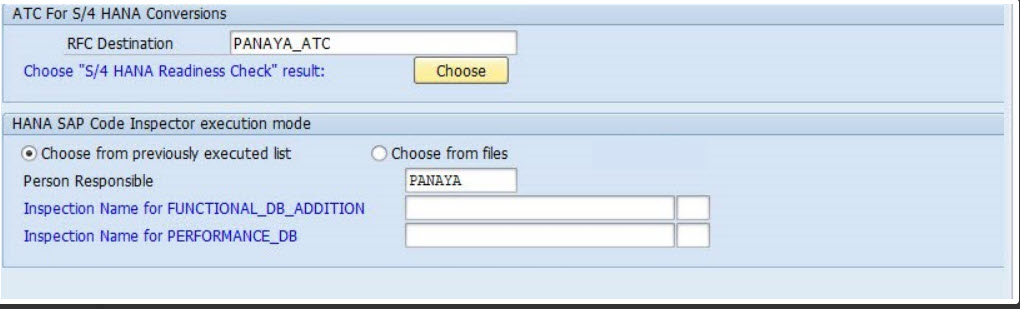
Option A - Choose from previously executed list (Recommended)
Select Choose from previously executed list if you want to use existing data from previous SAP Code Inspector runs. You can perform those runs by following the instructions in this article.
Then fill in the values for the FUNCTIONAL_DB (for non-S/4HANA conversion), FUNCTIONAL_DB_ADDITION, and PERFORMANCE_DB fields from the previously executed Code Inspector.
More about how to run HANA SAP Code Inspector?

For S/4HANA Conversion projects (S/4Convert):
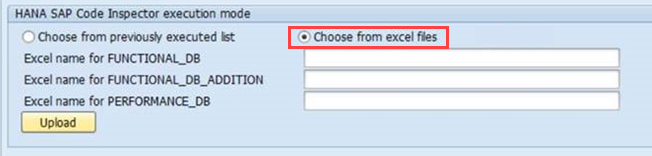
Option B - Choose from Excel files
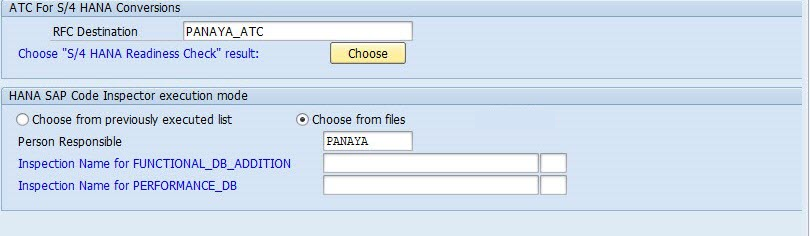
Select Choose from excel files if you wish to run the Panaya Code Extractor before migrating your system to HANA and still receive a HANA Impact Analysis. To learn more about how to export these XLS files, click here.
For S/4HANA Conversion projects (S/4Convert) and S/4HANA Accelerate (S/4Accelerate) projects:
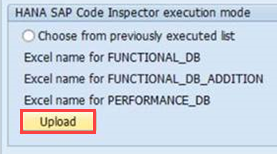
Click Upload.
Important!
When selecting option A or B, verify that you are using the most recent output of the HANA extraction.
Using older versions for a custom code extraction may cause discrepancies in HANA analysis.
Run HANA SAP Code Inspector in offline mode
Export HANA Code Inspector using Excel
- If you are having trouble extracting your custom code for HANA migration, click here.
- If you receive Warnings or Errors in the Code Inspector Results, click here.