In some cases, ScriptBuilder may fail to record steps - clicking Record in a web application opens the browser and returns an Unable to record error.
This behavior may occur when the user's browser Developer Tools are disabled.
How to Resolve
Using an account with admin permissions, open Microsoft Edge or Google Chrome.
Verify whether Developer Tools can be accessed by hitting F12.
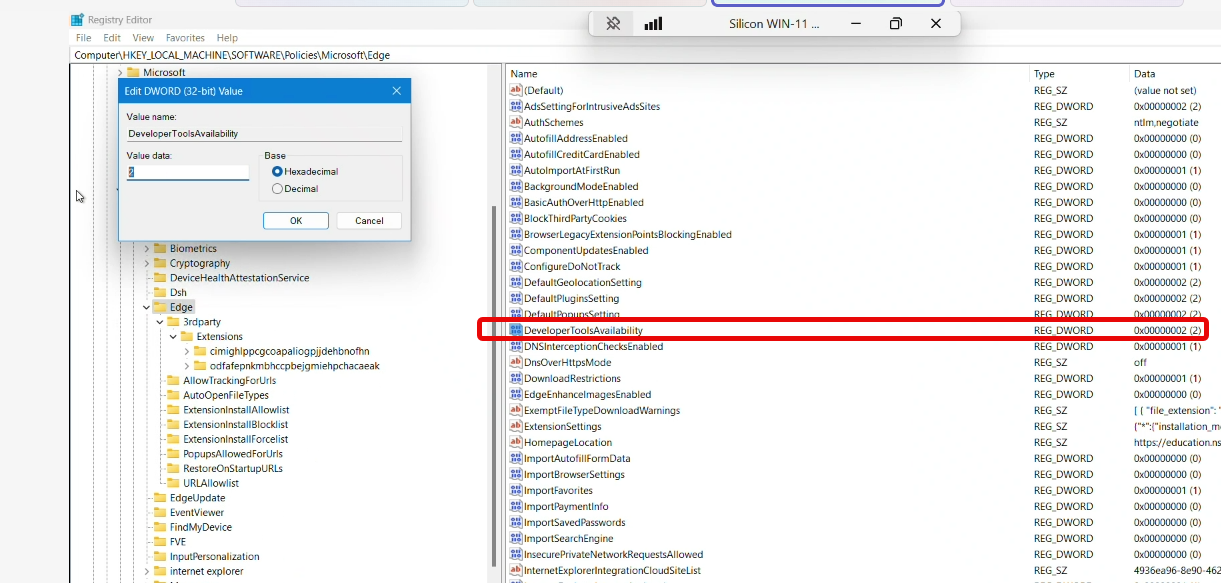
If Developer Tools do not open, check the browser policy or registry settings.
Update the Developer Tools registry value to 0.
Restart the browser.
Launch ScriptBuilder and click Record.
Confirm that the recording starts successfully.