Panaya supports organizations with regulatory compliance requirements by streamlining and digitizing manual testing processes.
You can set a Cycle to Regulated to enforce controlled review, approval, and electronic signature workflows before and after test execution. Regulated cycles support both Any Approver and Assigned Approval Workflow modes, including sequential approval chains for designated reviewers.
In a Regulated Cycle, users cannot execute test steps (Run & Document or Manual Run) or report defects until all required pre-execution reviews are completed and the test is electronically signed. If an Assigned Approval Workflow is configured, approvals must be completed in the configured sequence before testing can begin.
After the approval workflow starts, the test becomes read-only until the review process is completed. Following test execution, designated approvers complete post-execution electronic sign-off according to the configured workflow.
For signed tests, users cannot add, edit, or delete test attachments.
For signed steps, users cannot add, edit, or delete step-level attachments.
This feature is part of the Panaya Compliance Package.
From within a Project, hover over the Tests tab and select Test Tree.
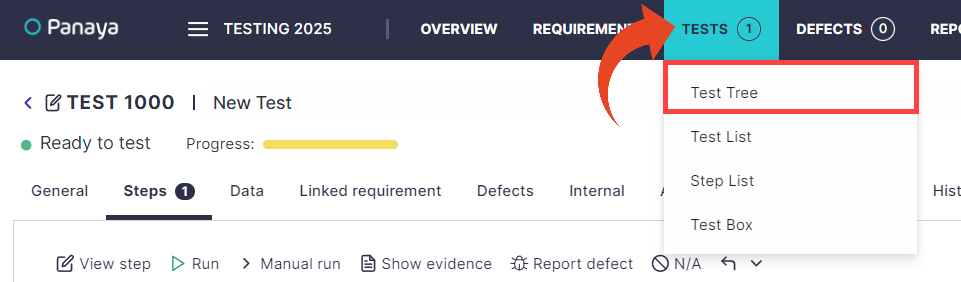
Highlight any Cycle in the tree and select the General tab.
Regulated
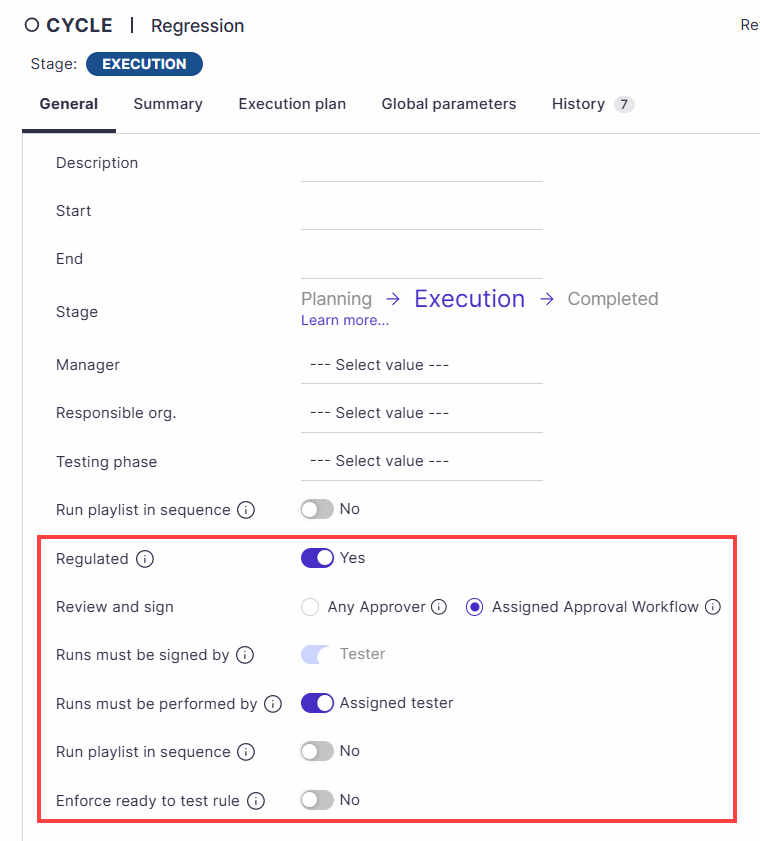
To set the cycle as regulated, set Regulated to Yes, then click on Switch.Review and sign
You can select between Any approver or Assigned Approval Workflow.
Any Approver
Any user with Review/Sign permission can review and electronically sign the test. No specific approvers need to be assigned.
Assigned Approval Workflow
Only designated approvers can review and electronically sign the test. Multiple approvers complete reviews sequentially in the configured order.
Good to Know!
When Assigned Approval Workflow option is selected -
You can configure up to six sequential approvers.
The test becomes read-only after the approval workflow starts.
Reviewer assignments can be updated while the workflow is in progress, without resetting completed approvals.
All pre-execution approvals must be completed before test execution can begin.
If any reviewer rejects the test during pre-execution review, the approval workflow must be restarted.
Runs must be signed by
Define whether passed test runs should be signed by the actual tester (Tester) or any user (Anyone with e-sign permissions).
When the Assigned Approval Workflow option is turned on, designated approvers sign each completed step individually or by using Mass E-Sign.Runs must be performed by
Define whether runs must be performed by the assigned tester or anyone.
Upon completion of the test run, the tester will be notified to e-sign the step(s).Restricted data
Panaya allows restricted data access for selected cycles. Use this option to control data access for tests on your production system or restrict sensitive data from specific users.
Learn more about Restricted CyclesEnforce ready to test rule
You can enforce the Ready to Test rule to strengthen process control. When enabled, only “Ready to Test” steps can be executed, and all other run actions are disabled.
Important!
Switching Regulated back to No will remove signatures from Tests and Test runs. However, historical e-signatures can still be viewed in the test's History tab.
To set Cycles to Regulated mode by default, or if you cannot view this option, please contact Panaya Support.