The Corrections by Priority widget is available for your SAP S/4HANA Conversion project. This view displays the entire Correction plan for your conversion project. Drill down to review, scope, prioritize, and assign the correction activities, automatically generated for you by Panaya. All the activities are presented according to their priority.
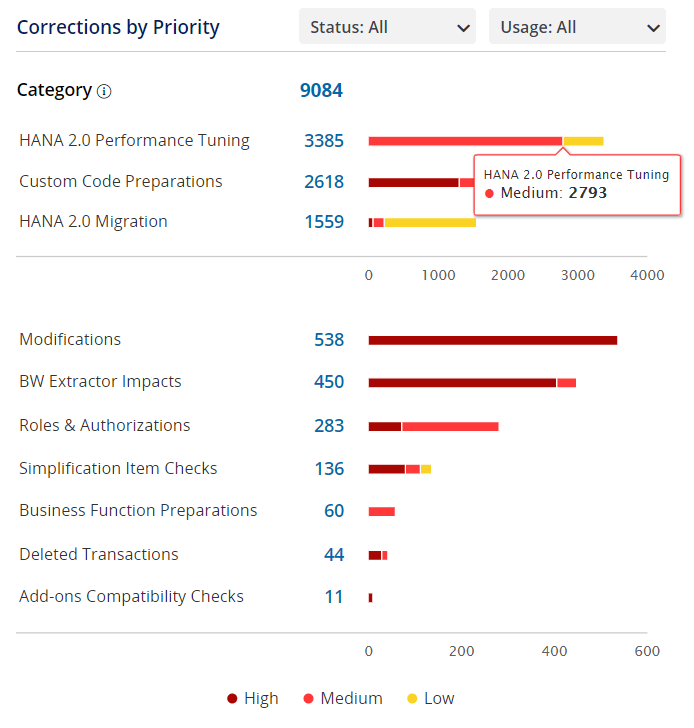
You can filter the correction activities by their status and usage.
When scoping the project activities, Panaya recommends that you consider moving some of the Low AND Unused activities (this does not apply to High and Unused) to Out of Scope to present a realistic project duration without introducing risk (activities can be re-introduced later if necessary). High, Unused activities should still be reviewed before scoping them out. If the project timeline is reasonable, review the Medium activities as well. Click here to learn how to mass edit the status of selected tasks.
Generally, object usage, Used or Unused, is based on usage data logged in ST03n. Some objects will not have usage maintained in ST03n and if their impacted transactions are also not used, they will be classified as unused. Unknown usage classification usually applies to objects that SAP does collect usage for or that were not able to be connected to any impacted objects or transactions.
You can complement your ST03N usage with UPL data (SAP Usage and Procedure Logging). UPL often captures runtime usage that ST03n may miss and provides a stronger basis for scoping decisions. To enable this option, please contact your customer success manager.