Act on execution agent issues before they affect your test runs. You can set up email notifications that alert one or more recipients when an agent stops responding.
When is an agent considered unresponsive?
An agent is considered unresponsive when it has sent no heartbeat for 10 minutes, and one of the following is true:
No execution is in progress, or
The last execution it fetched is still incomplete after 2 hours.
An alert is sent once per issue. It is not repeated unless the agent recovers and then becomes unresponsive again.
Setting up notifications
Click the settings button to open the settings panel.
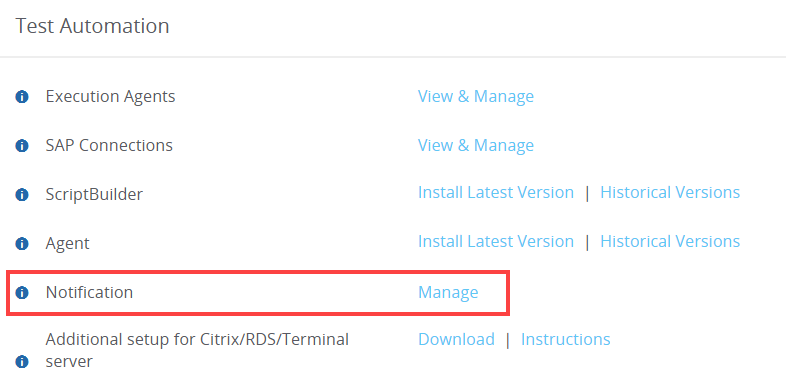
Scroll down to the Test Automation section and click Manage next to Notification.
Turn on the Agent not responsive toggle.
In the Send mail to field, type an email address and click Add. Repeat for each recipient.
To remove a recipient, click the × next to their address.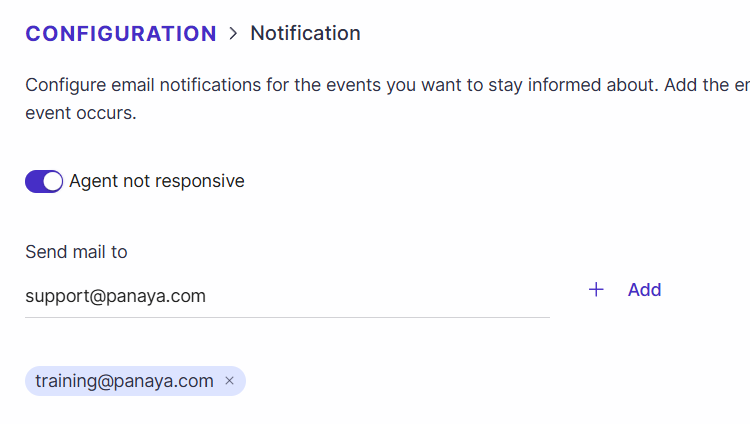
Click Save.
Turning Alerts Off
To stop the alerts, turn off the Agent not responsive toggle and click Save.