Panaya supports sensitive input parameters for cases where test data includes confidential or restricted information such as passwords, tokens, or personal data. These parameters are automatically encrypted by Panaya to ensure secure storage and execution.
When you mark an input parameter as sensitive, Panaya encrypts the value at rest and masks it in the user interface. The original value is never displayed after it is saved. During test execution, Panaya decrypts the value securely and passes it to the automation without exposing it to users.
Sensitive parameter values cannot be viewed or edited directly after saving. To change the value, you must re-enter it.
Sensitive parameters are masked in all logs, reports, and execution views.
Encryption is handled automatically by Panaya. No additional configuration is required.
You can use sensitive parameters in API Call instructions.
Sensitive parameters can only be used in sensitive fields -
In Web applications, for input fields where
type="password".In SAP GUI, for
locatorType = TYPE_AND_NAMEandcomponentType = GuiPasswordField.
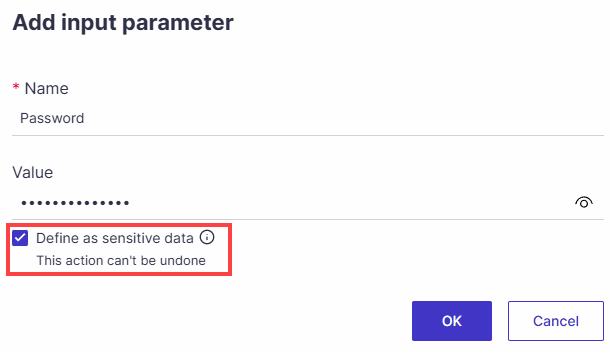
Sensitive Data in Global Parameters
Global parameters can be marked as sensitive, enabling secure, encrypted handling of shared values such as passwords and confidential credentials, thereby strengthening governance and protecting critical data across automation and testing workflows.
Learn more