If you encounter issues when trying to capture screens using the Panaya recorder or player, follow the suggested solutions below.
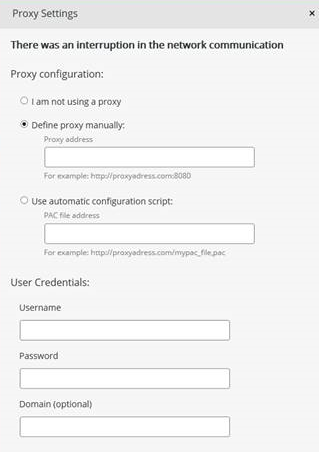
- It might be that a proxy is used within your network, preventing Panaya's player and recorder from working correctly.
- If you have an anti-virus, VPN, Remote Machine, or Virtual Machine, you might need to contact your IT administrator and request to add Panaya to the safe domains list. Sites on this list do not require a proxy or any other security permission.
- Contact your IT administrator and request to add the following URL to the exception lists -
- *.Panaya.com
Alternatively, add the following URLs to your white-list:- my.panaya.com or emea.panaya.com
- cdn.panaya.com
- *.Panaya.com
- sso-emea.panaya.com
- sso-us.panaya.com
- my.panaya.com/download/dotnet/player/online/Player.application
- emea.panaya.com/download/dotnet/player/online/Player.application
- *.Panaya.com