Panaya identifies third-party namespaces in your SAP system as part of Impact Analysis. Corrections associated with third-party code are typically handled by the relevant software vendor.
If Panaya identifies a namespace as third-party but you maintain that code internally, you can exclude the namespace from the third-party classification. Panaya will then consider the specified namespace as customer code and include the relevant corrections in the analysis.
Open Settings and select the relevant system.
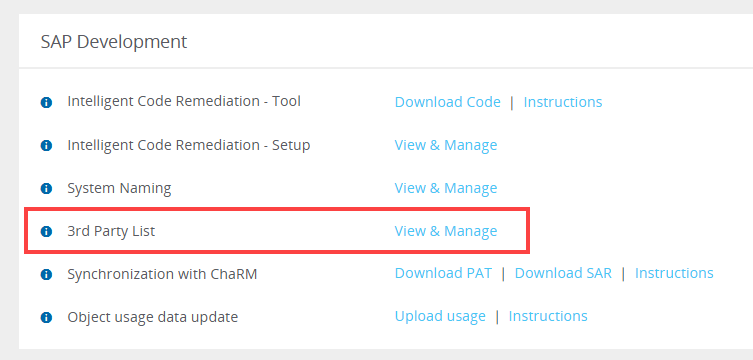
Under SAP Development, locate 3rd Party List and click View & Manage.
In 3rd Party Namespaces To Exclude, enter the namespaces you want Panaya to consider as customer code.
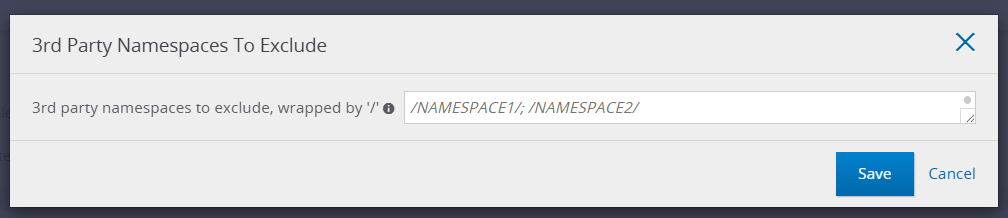
Enter each namespace using the
/NAMESPACE/format. Separate multiple namespaces with semicolons.Click Save.
Upload a new custom code extraction (ETL) so that the updated classification is applied to the analysis.
Example
/NAMESPACE1/; /NAMESPACE2/
Good to Know!
This setting changes how the specified namespace is classified in analysis. It does not exclude the namespace from the extraction.
Namespace Exclusions
The 3rd Party List setting is different from the S_NSPEXC extraction parameter documented in Configuring extraction parameters.
3rd Party List
Excludes the specified namespace from third-party classification so Panaya treats it as customer code during analysis.S_NSPEXC
Excludes a namespace from the extraction itself.