This Setup is no longer needed for new S/4Convert projects
S/4Convert now includes all S/4Code features in a single project, so new S/4Convert projects can't be set up side-by-side with S/4Code. This page applies to existing projects that already run side-by-side (now labeled S/4Convert Core) and to S/4Accelerate projects until the unified S/4Accelerate becomes available. Learn about the new S/4Convert
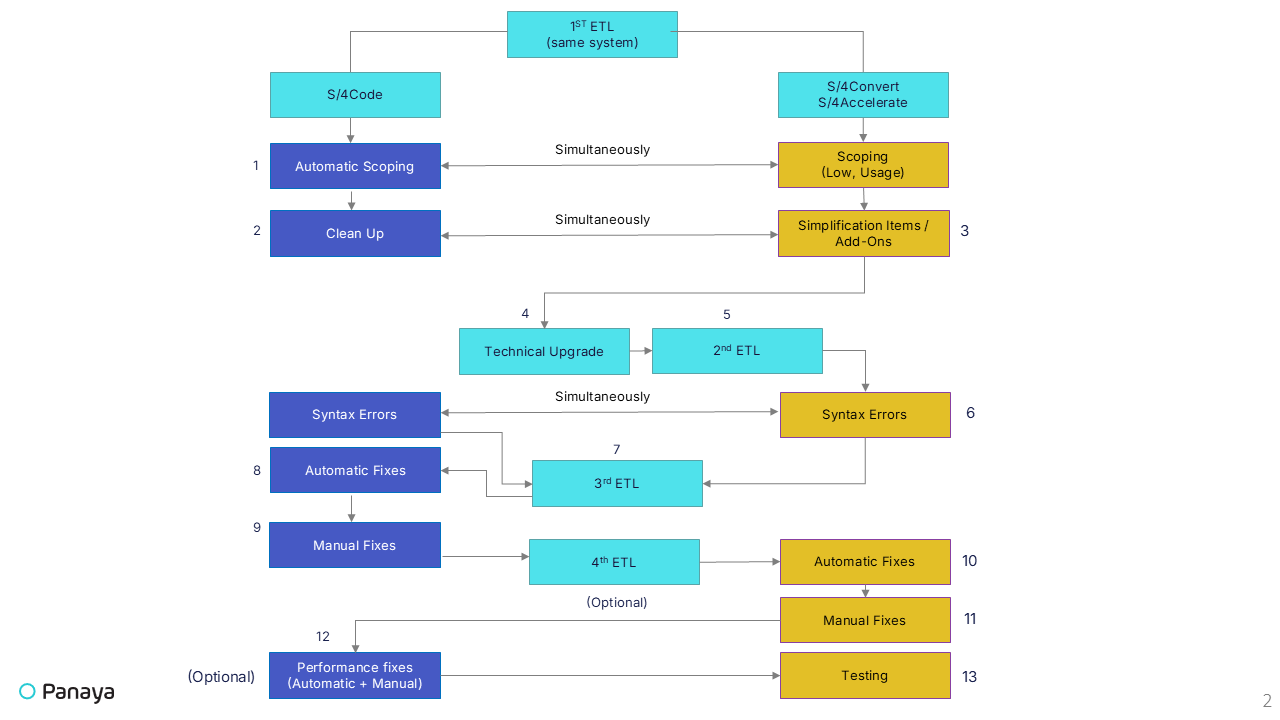
In certain scenarios, you may need to run S/4Code, S/4Convert, or S/4Accelerate projects side-by-side on the same SAP system. This article provides guidelines for configuring such a setup and best practices for task allocation between the two project types.
S/4Code Project handles the following -
ATC corrections
HANA migration corrections
HANA performance corrections
S/4Convert and S/4Accelerate Project handle the following -
All remaining upgrade tasks (including testing)
ICR for cloned programs and obsolete functions
SI-related activities
Note
The ICR Coverage Report will not be visible in the S/4Convert or S/4Accelerate project when using this side-by-side configuration.
Recommended Workflow
This dual-project setup clearly separates technical code corrections from broader conversion or acceleration activities while maintaining flexibility and traceability.